v0.8.0 — Just released: ClumsyLinkWatch is a free public download. Download now.

ClumsyLinkWatch

v0.8.0 · Windows · Free

Prove it wasn't your network.

ClumsyLinkWatch continuously probes your connection — adapter, gateway, ISP first hop, DNS, and a quorum of independent internet anchors — and classifies exactly where a failure happened. When your ISP says everything looks fine on their end, you hand them a report instead of an argument.

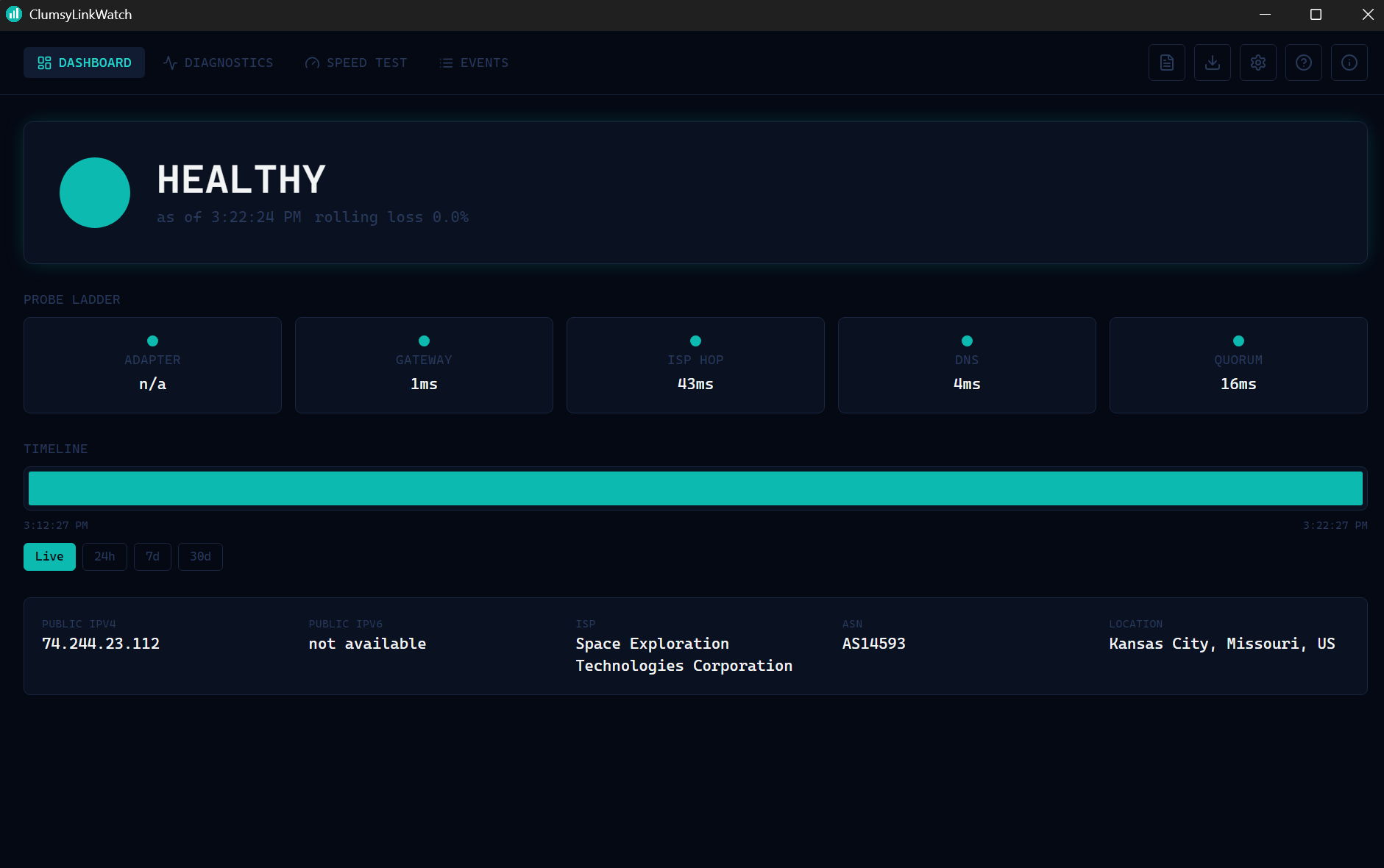
ClumsyLinkWatch live dashboard showing connection status, probe ladder, and timeline
ClumsyLinkWatch v0.8.0 Live status · probe ladder · timeline

Free for personal use · Windows 10/11 only

5-rung probe ladder ISP-fault classification HTML & PDF evidence reports Live timeline with history Discord/Slack webhook alerts Starlink & dual-WAN aware Scheduled speed tests & pattern detection

What it does

The customer says the internet is dropping. The ISP says everything looks fine on their end. ClumsyLinkWatch runs continuously in the background, and when the link goes down it doesn't just log "outage" — it works out whose fault it was and keeps the receipts.

Probe ladder
Five checks in order, cheapest and closest first: adapter, gateway, ISP first hop, DNS, and a quorum of 3+ independent internet anchors. Confirmation retries before anything is declared down — a single dropped packet, which ISPs routinely rate-limit, proves nothing.
Fault classification
Adapter/gateway faults are yours. Last-mile, DNS, and upstream faults are the ISP's. Degraded means up but unusable. Host sleep is never counted as downtime, ever — a laptop that sleeps for nine hours doesn't get reported as a nine-hour outage.
Evidence reports
Export HTML or PDF with a plain-English methodology paragraph, an ISP-attributable outage table, a day-by-day timeline, and an appendix listing every excluded event and why — nothing hidden, because hiding data looks worse than showing it.
Live dashboard
A status card that reads at a glance, per-rung latency, a real-time timeline strip with hover detail and Live/24h/7d/30d zoom, a 14-day latency trend chart, and the last full traceroute — every rung run every cycle for full evidence, not just wherever the ladder gave up.
Alerts that don't spam
Native desktop notifications and taskbar flashing for real faults — not for DEGRADED or sleep, which don't deserve the same urgency. Optional webhook alerts to Discord or Slack the moment something opens or closes.
Hardware aware
Detects a Starlink dish on the LAN, lists network adapters for dual-WAN setups, and checks for captive portals or DNS hijacking — the kind of interception that can make a broken connection look perfectly healthy.
Scheduled speed tests
Run automatically on a schedule you pick, with full history and a day/time heatmap that flags recurring slow windows on its own — the difference between "it feels slow sometimes" and "it's 40% slower every weeknight at 8pm."

Feature highlights

Probe ladder

Five checks in order, cheapest and closest first.

  • Adapter → gateway → ISP first hop → DNS → quorum
  • Confirmation retries before declaring a fault
  • Full traceroute run periodically for evidence
  • Every rung checked every cycle, not just until one fails

Fault classification

Knows whose fault it is, automatically.

  • LAST_MILE_DOWN, DNS_FAILURE, UPSTREAM_DOWN
  • ADAPTER_DOWN / GATEWAY_DOWN kept separate — your fault
  • DEGRADED — up but past a loss/latency threshold
  • HOST_SLEEP / MONITORING_GAP never counted as uptime or downtime

Evidence reports

The receipt your ISP can't wave away.

  • HTML & PDF export
  • Uptime %, "nines," and total outage time
  • ISP-attributable outage table
  • Appendix of excluded events — nothing hidden

Live dashboard

Reads at a glance, from across the room.

  • Timeline width proportional to real time, not per-poll
  • Hover any segment for exact time and duration
  • Live / 24h / 7d / 30d zoom
  • 14-day latency trend chart

Alerts

Know the moment it drops.

  • Native desktop notifications
  • Taskbar flash on real faults only
  • Discord/Slack-compatible webhook alerts
  • System tray status, color-coded live

Hardware aware

Built for real home networks, not a lab rack.

  • Starlink dish detection on the LAN
  • Network adapter visibility for dual-WAN setups
  • Captive portal / DNS hijack detection

Scheduled speed tests

Not just a one-off number — a real history.

  • Runs on your own schedule: 30 min to 24h, off by default
  • Full history, sortable by worst download/upload/latency
  • Day/hour heatmap flags recurring slow windows automatically
  • Never counted as a false outage against itself

Starlink dish monitoring, built in

If you're on Starlink, ClumsyLinkWatch talks to your dish directly over its own local diagnostics link — no separate app, no account. Alignment, obstruction map, throughput, loss and latency against Starlink's own published targets, and the dish's own event log, all in one place.

Starlink integration, live Dish status · alignment · obstruction map · event log

Latest release

v0.8.0
2026-08-06
Feature Update
  • Your standby connection is monitored too — until now the app watched whichever link your traffic was leaving through, so a backup WAN could be dead for weeks and you would find out at the worst possible moment. Every link you are not using is now probed in its own right, on the same ladder and through the same classifier as the active one.
  • Every rung is bound to the link it is testing — the part that makes the above trustworthy rather than decorative. An unbound probe measures whichever connection Windows preferred and reports the result as this link's, which is evidence that looks perfectly valid and is wrong.
  • Wi-Fi signal strength, read properly — signal, channel, radio type and link rates from the Windows Native Wifi API directly, rather than by scraping command output that is translated into the system language and silently returns nothing on a non-English Windows.
  • A weak signal is raised as a doubt, not used to erase the outage — where the radio was genuinely in trouble the app says so and quotes the measured dBm, but the event stays counted against your ISP and the suspicion is printed beside it. A rule that wrongly excused a real ISP fault as "your Wi-Fi was weak" would be worse than having no rule at all.
  • Nothing is claimed when nothing was measured — where signal strength cannot be read by any route, nothing is flagged and nothing is excluded. A missing reading must never become a claim that the host was wired.
  • Fixed: the app could pick a dead adapter as your connection — the default-route lookup did not check whether the adapter behind a route was actually up, so on a machine with several interfaces it could settle on a disconnected one and report everything from that vantage point.
Download →

Download and get started

ClumsyLinkWatch™ is a free download for personal use. It monitors your connection continuously, classifies faults by whose responsibility they are, and produces a report you can actually hand to your ISP. No nags, no expiry, no account required.

Download Free Join Discord  ·  Email support